Create Git repository
Note: Only PMC members have the permission to do the following operations.
Create Git repository
Fill in the new repository information in GitBox [1]. Take shenyu-helm-chart as an example.
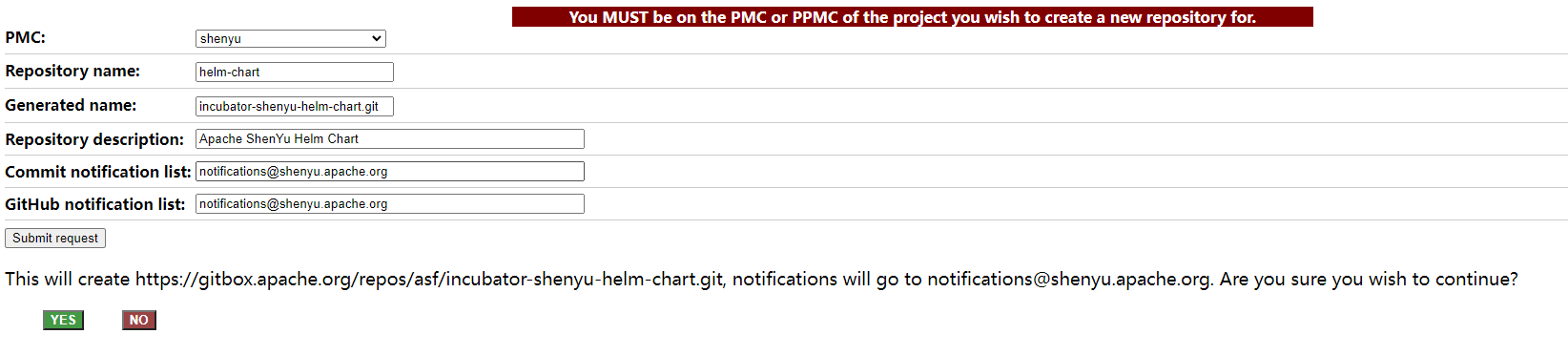
PMC: choose shenyuRepository name: helm-chart (the suffix, not the full name)Generated name: shenyu-helm-chart.git (full name automatically generated, no need to fill in)Commit notification listandGitHub notification list: notifications@shenyu.apache.org
Click
Yesto complete the creation. The GitHub repository creation process will take about an hour.
Initialize the GitHub repository
- Once the GitHub repository is created, follow the instructions on the page to complete your first commit.
- Add
LICENSE,NOTICEandDISCLAIMERfiles. - Add
.asf.yamlto custom repository configuration. A detailed description of .asf.yaml can be found here [2].
helm-chart's .asf.yaml, with branch protection turned on, will need to be committed with PR for future code after push.
github:
  description: ShenYu is High-Performance Java API Gateway.
  homepage: https://shenyu.apache.org/
  labels:
    - shenyu
    - helm chart
  features:
    wiki: true
    issues: true
    projects: true
  ghp_branch: main
    ghp_path: /docs
  enabled_merge_buttons:
    squash: true
    merge: false
    rebase: false
  protected_branches:
    main:
      required_status_checks:
        strict: true
      required_pull_request_reviews:
        dismiss_stale_reviews: true
        required_approving_review_count: 1
notifications:
  commits: notifications@shenyu.apache.org
  issues: notifications@shenyu.apache.org
  pullrequests: notifications@shenyu.apache.org
The content refers to
[1] https://gitbox.apache.org/setup/newrepo.html
[2] https://cwiki.apache.org/confluence/display/INFRA/Git+-+.asf.yaml+features