自定义限流策略
说明
-
在自定义开发前,请先自定义搭建好网关环境,请参考: 自定义部署
-
本文介绍如何对
org.apache.shenyu.plugin.ratelimiter.algorithm.RateLimiterAlgorithm进行自定义扩展。
扩展实现
- 新建一个工程,引入如下依赖:
<dependencies>
    <dependency>
        <groupId>org.apache.shenyu</groupId>
        <artifactId>shenyu-plugin-base</artifactId>
        <version>${project.version}</version>
    </dependency>
</dependencies>
- 新增一个类
${you class},实现org.apache.shenyu.plugin.ratelimiter.algorithm.RateLimiterAlgorithm
public class ${you class} implements RateLimiterAlgorithm<T> {

    /**
     * Gets script.
     *
     * @return the script
     */
    public RedisScript<T> getScript() {
        //你的开发逻辑
    }

    /**
     * Gets keys.
     *
     * @param id the id
     * @return the keys
     */
    public List<String> getKeys(String id) {
        //你的开发逻辑
    }
    /**
     * Callback string.
     *
     * @param script the script
     * @param keys the keys
     * @param scriptArgs the script args
     */
    default void callback(final RedisScript<?> script, final List<String> keys, final List<String> scriptArgs) {
        //你的开发逻辑
    }
}
- 在项目
resources目录下,新建META-INF/shenyu目录, 并且新增文件名为 :org.apache.shenyu.plugin.ratelimiter.algorithm.RateLimiterAlgorithm. 内容新增${you spi name}=${you class path}:
${you spi name} = ${you class path}
-
将工程打包,拷贝到网关 (bootstrap-bin) 的
lib或ext-lib目录。 -
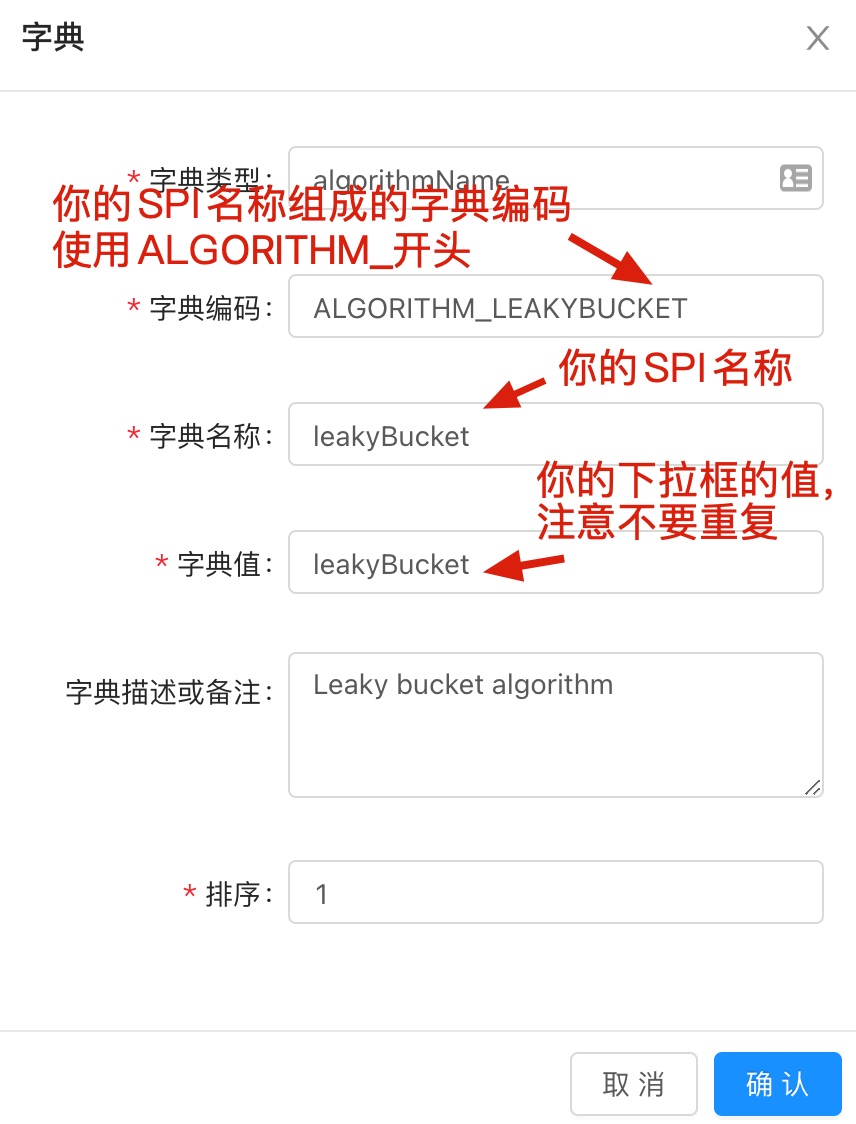
在
Admin后台 ---> 基础管理 ---> 字典管理 , 找到字典编码为ALGORITHM_*,新增一条数据,注意字典名称要为:${you spi name}。
- 或者执行以下自定义
SQL语句:
INSERT IGNORE INTO `shenyu_dict` (
        `id`,
        `type`,
        `dict_code`,
        `dict_name`,
        `dict_value`,
        `desc`,
        `sort`,
        `enabled`,
        `date_created`,
        `date_updated`
    )
VALUES (
        'you id',
        'matchMode',
        'MATCH_MODE',
        'you spi name',
        'you value',
        'you spi name',
        0,
        1,
        '2021-08-30 19:29:10',
        '2021-08-30 20:15:23'
    );