Custom Rate Limiter
Explanation
-
Before custom development, please customize and build the gateway environment first, please refer to: custom deployment.
-
This article describes how to customize the extension of
org.apache.shenyu.plugin.ratelimiter.algorithm.RateLimiterAlgorithm.
Extension
- Create a new project and introduce the following dependencies:
<dependencies>
    <dependency>
        <groupId>org.apache.shenyu</groupId>
        <artifactId>shenyu-plugin-base</artifactId>
        <version>${project.version}</version>
    </dependency>
</dependencies>
- Create a new class
${you class}, implementsorg.apache.shenyu.plugin.ratelimiter.algorithm.RateLimiterAlgorithm
public class ${you class} implements RateLimiterAlgorithm<T> {

    /**
     * Gets script.
     *
     * @return the script
     */
    public RedisScript<T> getScript() {
        //coding and return
    }

    /**
     * Gets keys.
     *
     * @param id the id
     * @return the keys
     */
    public List<String> getKeys(String id) {
        //coding and return
    }

    /**
     * Callback string.
     *
     * @param script the script
     * @param keys the keys
     * @param scriptArgs the script args
     */
    public void callback(final RedisScript<?> script, final List<String> keys, final List<String> scriptArgs) {
        //coding and return
    }
}
- In the project
resourcesdirectory,Create a newMETA-INF/shenyudirectory, and the new file name is :org.apache.shenyu.plugin.ratelimiter.algorithm.RateLimiterAlgorithm. add${you spi name}=${you class path}:
${you spi name} = ${you class path}
-
Package the project and copy it to the
liborext-libdirectory of the gateway (bootstrap-bin). -
In the
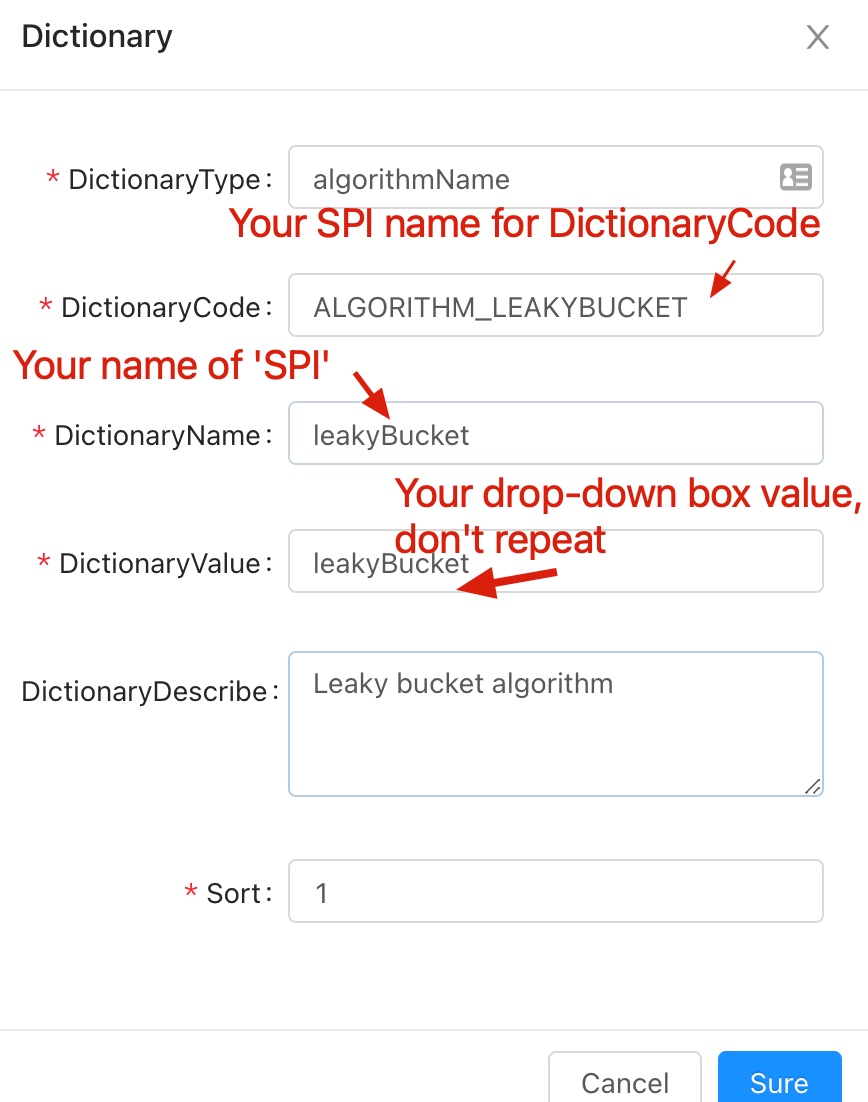
Adminservice ---> BasicConfig ---> Dictionary , Find the dictionary code asALGORITHM_*, add a new piece of data, pay attention to the dictionary name:${you spi name}.
- Or execute the following custom
SQLstatement:
INSERT IGNORE INTO `shenyu_dict` (
        `id`,
        `type`,
        `dict_code`,
        `dict_name`,
        `dict_value`,
        `desc`,
        `sort`,
        `enabled`,
        `date_created`,
        `date_updated`
    )
VALUES (
        'you id',
        'matchMode',
        'MATCH_MODE',
        'you spi name',
        'you value',
        'you spi name',
        0,
        1,
        '2021-08-30 19:29:10',
        '2021-08-30 20:15:23'
    );