使用Consul接入
背景说明
Shenyu提供了Shenyu-Sdk方便让服务能够快速接入shenyu网关, 客户端服务只需要依赖该sdk, 并做些简单配置, 即可类似调用本地接口一样调用网关暴露的API。
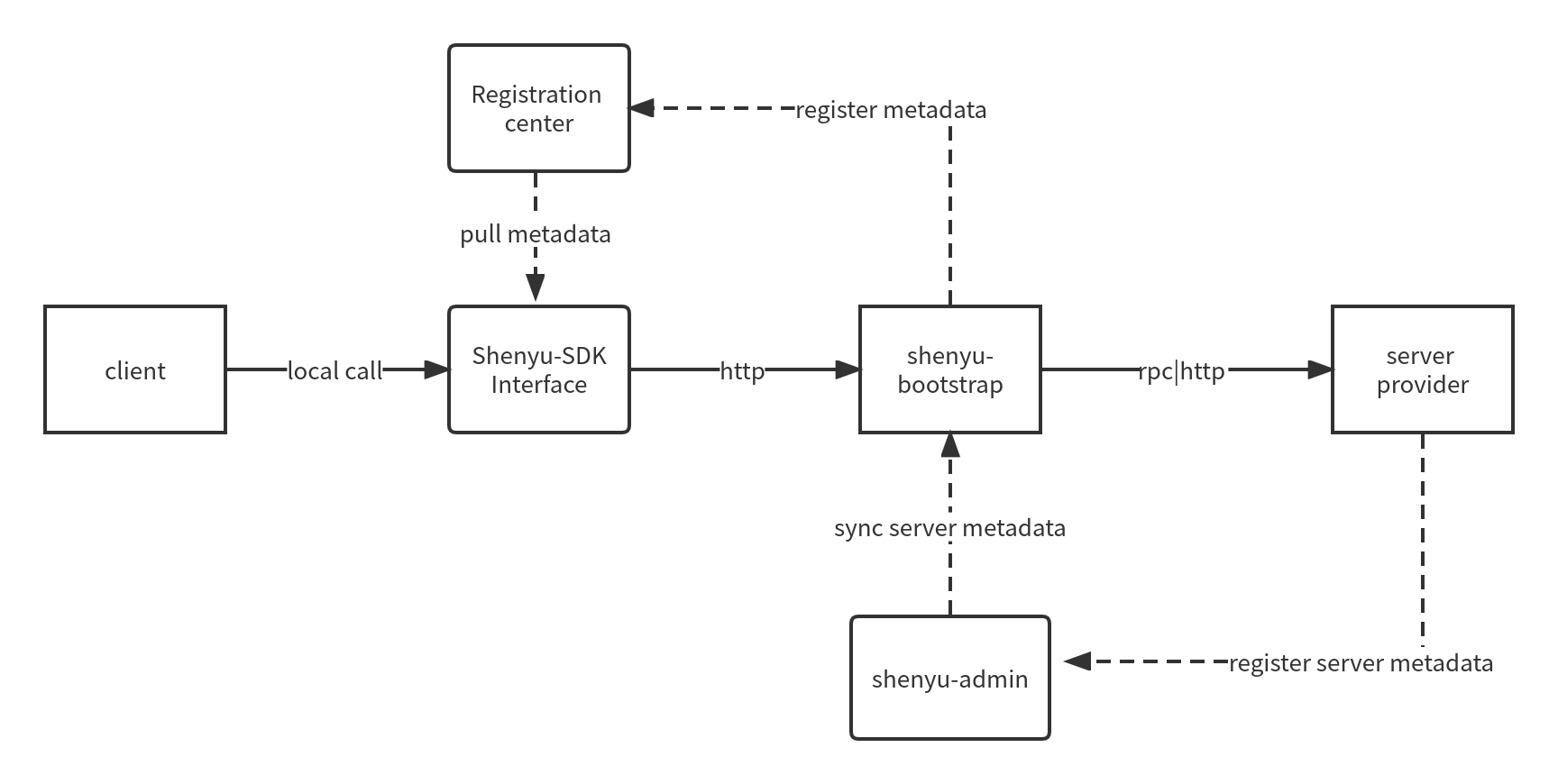
客户端接入网关的注册中心支持(nacos、eureka、etcd、zookeeper、consul),下面为shenyu-bootstrap及应用客户端使用Zookeeper注册中心时的相关指引。
环境准备
需要参考 运维部署 , 选择一种方式启动shenyu-admin及shenyu-bootstrap.
shenyu-bootstrap
添加Maven依赖
在网关的pom.xml文件中引入如下依赖.
<dependency>
    <groupId>org.apache.shenyu</groupId>
    <artifactId>shenyu-spring-boot-starter-registry</artifactId>
    <version>${project.version}</version>
</dependency>
配置文件调整
在网关的yml配置文件中添加如下配置.
shenyu:
  register:
    enabled: true
    registerType: consul
    serverLists: localhost
    props:
      delay: 1
      wait-time: 55
      instanceId: shenyu-gateway
      hostName: localhost
      tags: test1,test2
      preferAgentAddress: false
      enableTagOverride: false

# registerType: 服务注册类型,填写 consul
# serverLists: consul client agent地址(sidecar模式部署(单机或者集群),也可以是consul server agent的地址(只能连接一个consul server agent节点,如果是集群,那么会存在单点故障问题))
# delay: 对Metadata的监控每次轮询的间隔时长,单位为秒,默认1秒
# wait-time: 对Metadata的监控单次请求的等待时间(长轮询机制),单位为秒,默认55秒
# instanceId: consul服务必填,consul需要通过instance-id找到具体服务
# name 服务注册到consul时所在的组名
# hostName: 为 consul 注册类型时,填写 注册服务实例的 地址, 该注册中心注册的服务实例地址,并不会用于客户端的调用,所以该配置可以不填,port,preferAgentAddress同理
# port: 为 consul 注册类型时,填写 注册服务实例的 端口
# tags: 对应consul配置中的tags配置
# preferAgentAddress:使用consul客户端侧的agent对应的address作为注册服务实例的address,会覆盖hostName的手动配置
# enableTagOverride:对应consul配置中的enableTagOverride配置

# 详细参考`用户指南>属性配置>客户端接入配置`文档
应用客户端
添加Maven依赖
在应用客户端的pom.xml文件中引入如下依赖.
- Shenyu-Sdk 核心包
<dependencies>
    <dependency>
        <groupId>org.apache.shenyu</groupId>
        <artifactId>shenyu-sdk-core</artifactId>
        <version>2.5.1-SNAPSHOT</version>
    </dependency>

    <dependency>
        <groupId>org.apache.shenyu</groupId>
        <artifactId>shenyu-spring-boot-starter-sdk</artifactId>
        <version>2.5.1-SNAPSHOT</version>
    </dependency>
</dependencies>
- Shenyu-Sdk http实现包
http客户端实现, 目前提供实现okhttp, httpclient. 其他客户端实现可继承
AbstractShenyuSdkClient实现。
<!-- httpclient -->
<dependency>
    <groupId>org.apache.shenyu</groupId>
    <artifactId>shenyu-sdk-httpclient</artifactId>
    <version>2.5.1-SNAPSHOT</version>
</dependency>

<!-- okhttp -->
<!--
<dependency>
    <groupId>org.apache.shenyu</groupId>
    <artifactId>shenyu-sdk-okhttp</artifactId>
    <version>2.5.1-SNAPSHOT</version>
</dependency>
-->
配置文件调整
在应用客户端的yml配置文件中添加如下配置.
shenyu:
  sdk:
    enabled: true
    register-type: consul #zookeeper #local #etcd #nacos #consul
    server-lists: localhost #localhost:2181 #http://localhost:9095 #http://localhost:2379 #localhost:8848
    props:
      checkTtl: 5
      token: ""
      waitTime: 30
      watchDelay: 5
      tags: ""
      port: 8500
      retry:
        enable: true
        period: 100
        maxPeriod: 1000
        maxAttempts: 5
      scheme: http
# register-type : 服务注册类型,填写 consul
# server-lists: 为consul注册类型时,填写consul地址,多个地址用英文逗号分隔
# checkTtl: TTL, 默认5秒
# token: ""
# waitTime: 对Metadata的监控单次请求的等待时间(长轮询机制),单位为秒,默认55秒
# watchDelay: 对Metadata的监控每次轮询的间隔时长,单位为秒,默认1秒
# tags: 对应consul配置中的tags配置
# port: consul 服务端口
# retry 失败重试相关配置
# retry.period: 重试等待时间
# retry.maxPeriod: 最大重试等待时间
# retry.maxAttempts: 最大重试次数
# scheme: 请求协议头
本地接口配置
-
在项目启动类上标注
@EnableShenyuClients(basePackages = "org.apache.shenyu.examples.sdk.http.api"), 其中basePackages中维护的是Shenyu-Sdk对应维护网关API接口的所在包位置. -
创建interface并使用
@ShenyuClient(name = "xxx", contextId = "ShenyuSdkApiName")注解标注, 其中name表示网关服务名.假如你需要定义多个bean来维护网关的API, 可以使用contextId作为对应的bean别名. -
在定义接口中添加所要映射shenyu网关中的接口方法, 其中
@xxMapping中的value对应值是网关中对应请求的路径。
示例
项目启动类
@SpringBootApplication
@EnableShenyuClients(basePackages = "org.apache.shenyu.examples.sdk.http.api")
public class ShenyuSdkHttpExampleApplication {

    /**
     * main.
     *
     * @param args args
     */
    public static void main(final String[] args) {
        SpringApplication.run(ShenyuSdkHttpExampleApplication.class, args);
    }
}
网关API接口
@ShenyuClient(name = "shenyu-gateway", contextId = "ShenyuSdkApiName")
public interface ShenyuHttpClientApi {

    /**
     * findById.
     * test Get.
     *
     * @param id id
     * @return SdkTestDto
     */
    @GetMapping("/http/shenyu/client/findById")
    SdkTestDto findById(@RequestParam("id") String id);
}
更多可参考示例工程 shenyu-examples-sdk