AiProxy Plugin
Description
The aiProxy plugin acts as a forwarding proxy for LLM requests, supporting major large-model services. Users send requests through ShenYu to a route configured with aiProxy; aiProxy then uses the plugin settings—such as provider (e.g., OpenAI, Alibaba Cloud), model name, API key, etc.—to call the corresponding LLM API and return the result. Typical use cases include forwarding chat requests to OpenAI’s ChatGPT endpoint or using domestic AI services for intelligent Q&A. Similar to previous plugin usage patterns, you can think of the LLM as taking on the role of your original application service. If you have a local model compatible with the OpenAI protocol or other mainstream protocols, you can also proxy it via the shenyu-aiProxy plugin.
Plugin Configuration
When configuring the plugin in the ShenYu admin interface, you first create a Selector, then create a Rule. A Selector is typically used to match request conditions (e.g., path, headers), while a Rule is used to configure plugin parameters or forwarding targets. For details on Selector and Rule configuration, see Selector and Rule Management.
When using the aiProxy plugin, pay attention to the following fields:
- Selector: Defines the paths or request characteristics to match. For example, set
Patternto/**to match all requests, or specify a particular route path. - Rule: Specify plugin parameters at the rule level. Common fields include:
provider: The name of the provider, e.g.,OpenAI.baseUrl: The API endpoint for the LLM provider.model: The model name.apiKey: The authorization key.
Below are example screenshots of the aiProxy plugin configuration in the admin UI:
Selector matching the incoming path, followed by Rule settings for provider, model, API key, upstream address, etc.
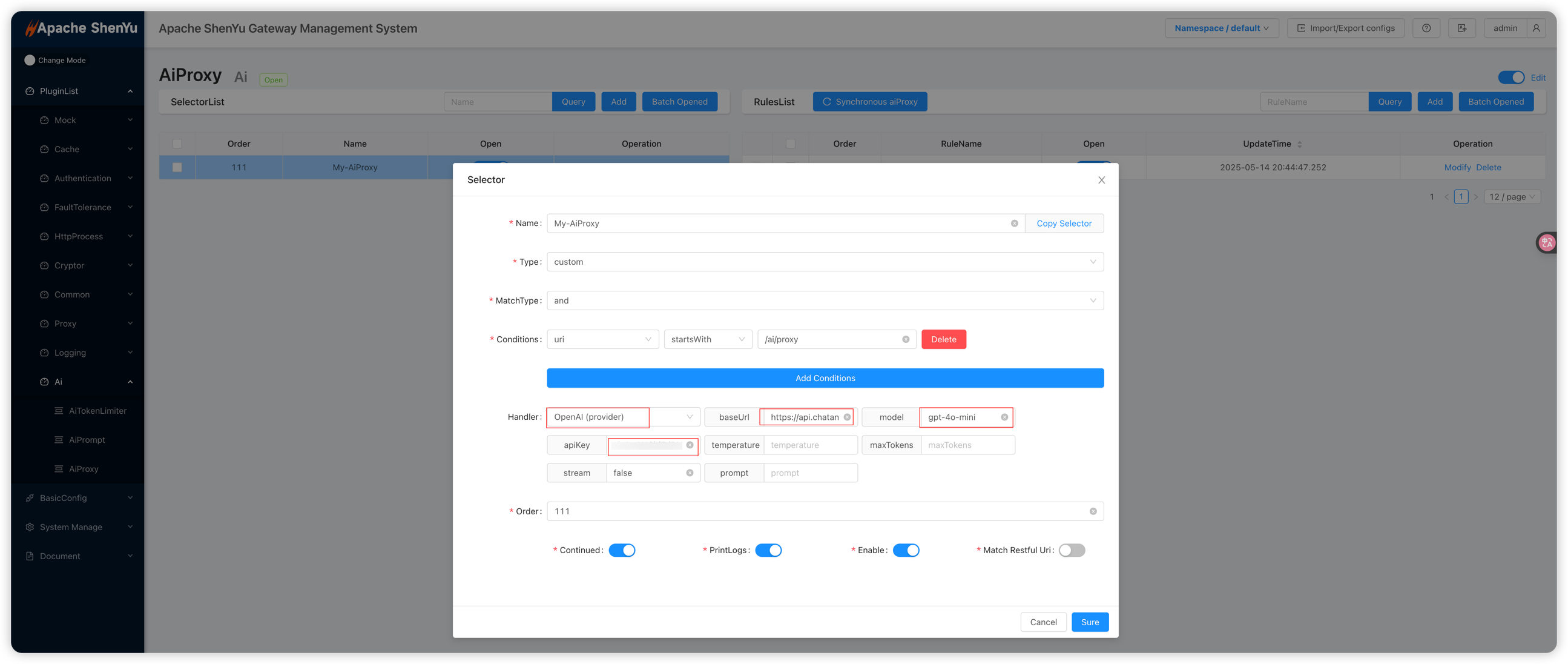
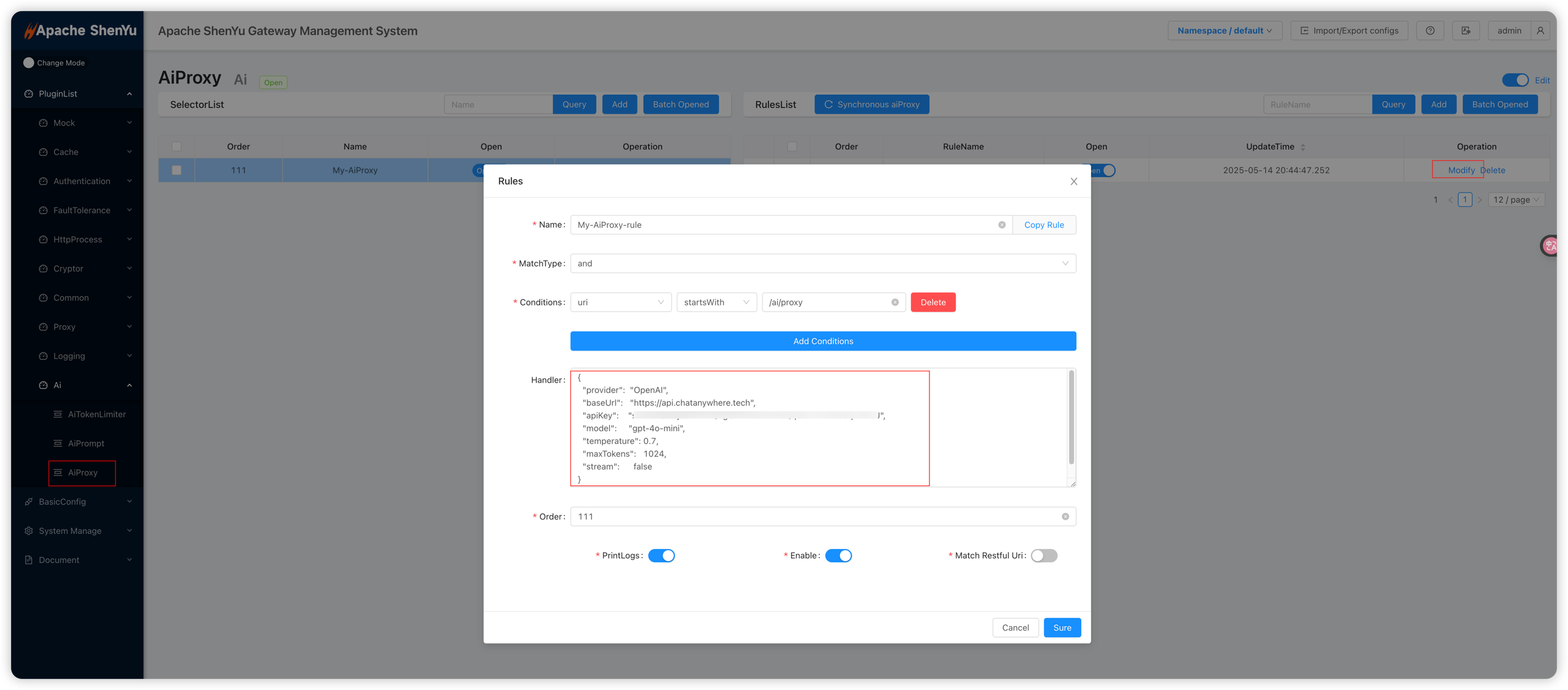
Note: With this setup, you also need to configure the
contextPathplugin to remove the matched prefix and assemble the correct call URL. See contextPath Plugin Configuration for details.
API Usage
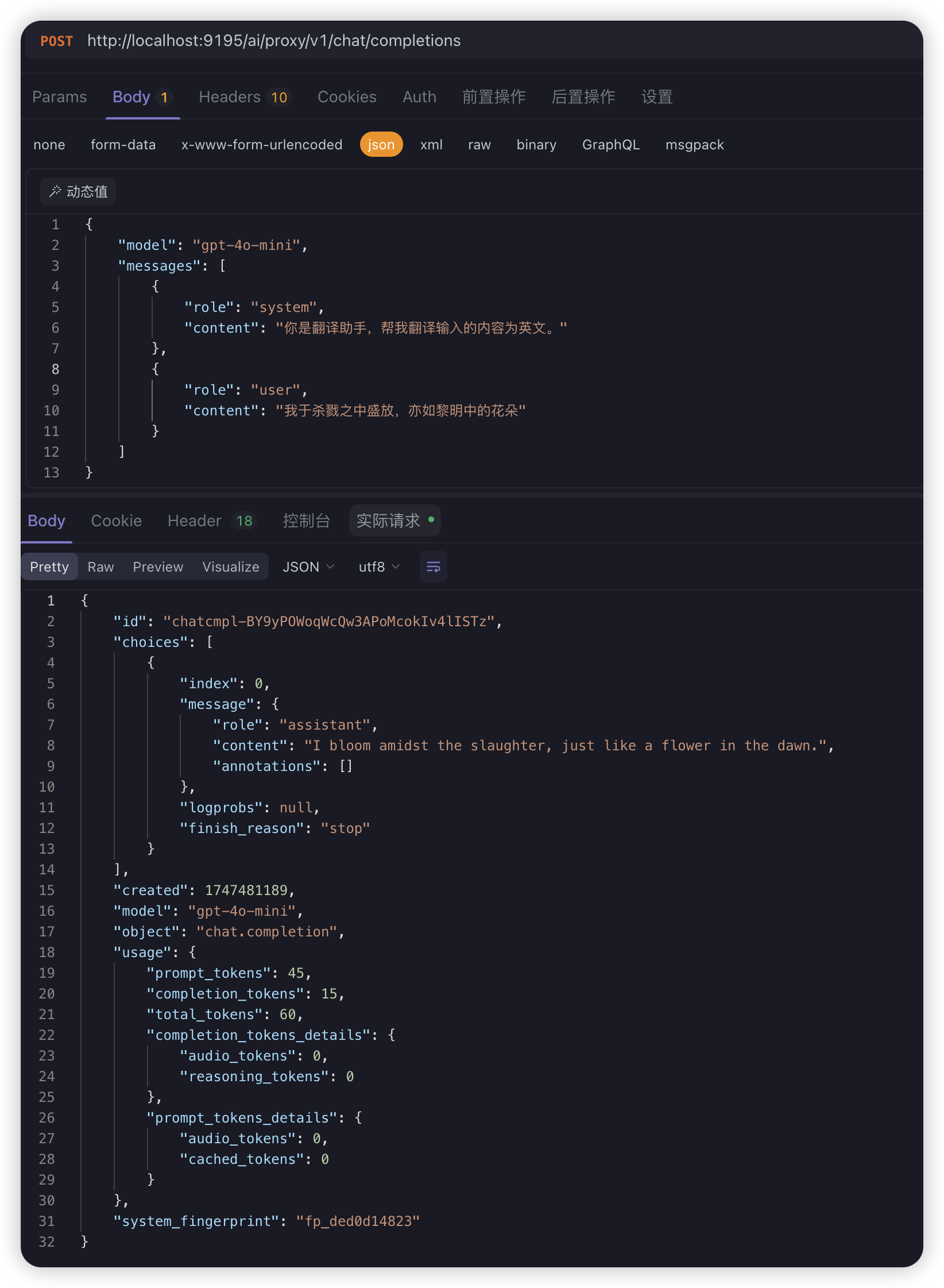
After enabling the aiProxy plugin, you can send requests to the ShenYu gateway (e.g., via Postman) and obtain LLM responses through the proxy:
curl --location --request POST 'http://localhost:9195/ai/proxy/v1/chat/completions' \
  --header 'Content-Type: application/json' \
  --data-raw '{
    "model": "gpt-4o-mini",
    "messages": [
      {
        "role": "system",
        "content": "You are a translation assistant. Please translate the input content into English."
      },
      {
        "role": "user",
        "content": "I bloom amidst slaughter, like a flower at dawn."
      }
    ]
  }'
API Key Management
The aiProxy plugin supports managing proxy API keys through the ShenYu Admin interface. Each proxy API key is scoped to a specific Selector and maps to a real upstream API key.
Admin Endpoints
Base path: /selector/{selectorId}/ai-proxy-apikey
| Method | Path | Description | Permission |
|---|---|---|---|
| POST | /selector/{selectorId}/ai-proxy-apikey | Create a proxy API key mapping | system:aiProxyApiKey:add |
| GET | /selector/{selectorId}/ai-proxy-apikey | List proxy API key mappings (paged) | system:aiProxyApiKey:list |
| PUT | /selector/{selectorId}/ai-proxy-apikey/{id} | Update a proxy API key mapping | system:aiProxyApiKey:edit |
| POST | /selector/{selectorId}/ai-proxy-apikey/batchDelete | Batch delete mappings | system:aiProxyApiKey:delete |
| POST | /selector/{selectorId}/ai-proxy-apikey/batchEnabled | Batch enable or disable mappings | system:aiProxyApiKey:disable |
Query Parameters (GET)
| Parameter | Required | Description |
|---|---|---|
currentPage | Yes | Page number |
pageSize | Yes | Page size |
proxyApiKey | No | Filter by proxy API key value |
Proxy API Key Authentication
When proxyEnabled is set to true in the Selector configuration, the plugin enforces API key authentication on all incoming requests.
Request Header
Clients must include the following header:
X-API-KEY: <proxy-api-key>
Authentication Behavior
| Scenario | HTTP Status | Description |
|---|---|---|
X-API-KEY header present and valid | 200 | Request forwarded; real upstream API key substituted transparently |
X-API-KEY header missing | 401 Unauthorized | Request rejected |
X-API-KEY header present but invalid | 401 Unauthorized | Request rejected |
Note: When proxy mode is enabled, the real upstream API key is never exposed to the client. The plugin resolves the mapping internally and substitutes the real key before forwarding the request to the LLM provider.