1. Overview
1.1 Plugin Name
- ParamMapping Plugin
1.2 Appropriate Scenario
- Add/remove/replace certain fixed parameters to the request
1.3 Plugin functionality
paramMappingis used to edit your request parameters.
1.4 Plugin code
-
Core Module
shenyu-plugin-param-mapping -
Core Class
org.apache.shenyu.plugin.param.mapping.ParamMappingPlugin
1.5 Added Since Which shenyu version
- Since ShenYu 2.4.0
2. How to use plugin
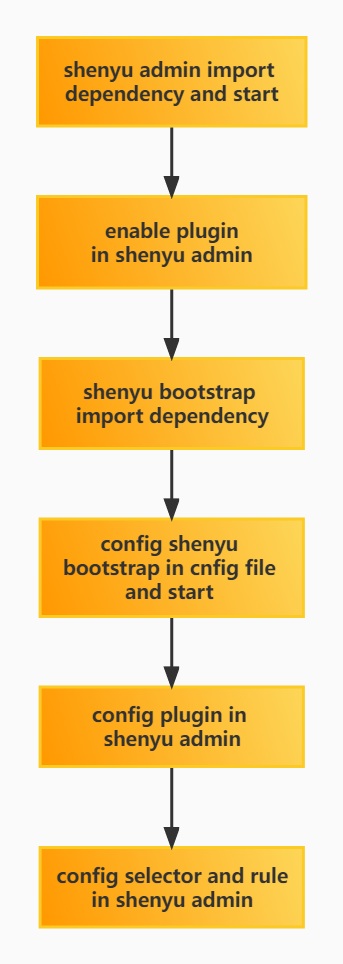
2.1 Plugin-use procedure chart
2.2 Import pom
- Introduce
paramMappingdependency in the pom.xml file of the gateway.
<!-- apache shenyu param_mapping plugin start-->
<dependency>
  <groupId>org.apache.shenyu</groupId>
  <artifactId>shenyu-spring-boot-starter-plugin-param-mapping</artifactId>
  <version>${project.version}</version>
</dependency>
<!-- apache shenyu param_mapping plugin end-->
2.3 Enable plugin
- In
shenyu-admin--> BasicConfig --> Plugin -->paramMappingset Status enabled.
2.4 Config plugin
2.4.1 Plugin Config
- you should open this plugin when using.
2.4.2 Selector Config
-
Selectors and rules, please refer to:Selector And Rule Config。
-
Only those matched requests can be modified your request body.
2.4.3 Rule Config
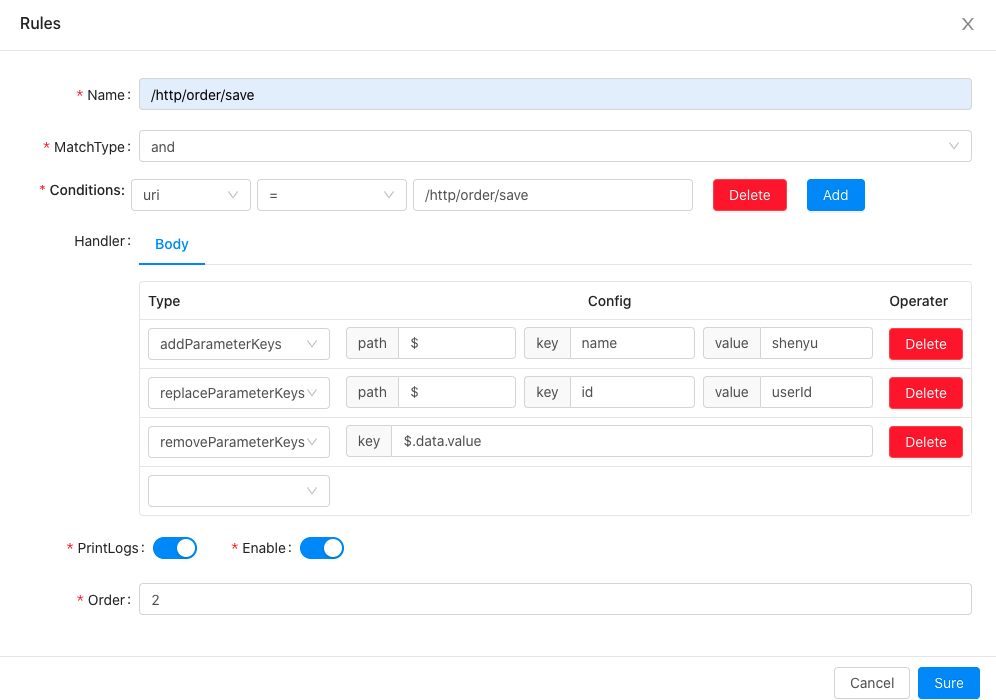
-
param details:
addParameterKeys: add a newkey-valueon bodyreplaceParameterKeys: replace request body'skey,keyis the value to be replaced,valueis the value after replacementremoveParameterKeys: remove a bodykey
-
param_mapping modify the request body is achieved through
JSONPath,$.represents the root directory.
2.5 Examples
2.5.1 Add parameters in request
2.5.1.1 Config Plugin
- you should open the plugin when using.
2.5.1.2 Selector Config
2.5.1.3 Rule Config
use the configuration,unopened the plugin,request body is:
{"id":3,"data":{"value":"18","age":"36"}}
2.5.1.4 Check Result
open the plugin,the final request body is
{"name":"shenyu","userId":3,"data":{"age":"36"}}
add a new key-value name:shenyu,replace the key id to userId, remove the key data.value .
3. How to disable plugin
- In
shenyu-admin--> BasicConfig --> Plugin -->paramMappingset Status disable.